I Am Trying to Make Vulnerability Management Easier
Last month I wrote about the frustration of running a vulnerability scan and getting thousands of results back, and the response confirmed what I already suspected: a lot of people are dealing with that exact problem and nobody is particularly happy about it. The scan finishes, the report drops, and you spend the next several hours copying findings into a spreadsheet, color-coding severity levels, writing notes, trying to figure out which results you’ve already reviewed, and eventually producing a document that looks professional enough to hand to a client or a manager. Then the next scan comes in and you do it all over again.
I’ve been through that cycle more times than I can count over the past decade of doing security work, and at some point the frustration stopped being something I complained about and became something I decided to fix. The gap between what enterprise platforms offer and what a small team actually needs has always been wide, and spreadsheets have been filling that gap by default for years, not because they’re good at it, but because nothing else was available at a price point or complexity level that made sense. That’s the origin story of JuturnaReport, a Windows desktop application I built to handle vulnerability triage and reporting for people who work with Nessus scan data. It’s been in development for a while, and I’ve been using it in my own work long enough to be confident that it solves the specific problem it was designed for. Now I’m making it available to anyone who wants it.
What JuturnaReport Actually Does
The core workflow is straightforward because the problem it solves is straightforward: you have a .nessus file full of scan results, and you need to turn those results into a set of triaged, prioritized findings that you can act on and communicate to other people. JuturnaReport imports .nessus files directly and presents every finding in a triage interface where you can review each one, assign a severity level, set a status, add analyst notes, assign it to a team member, and either accept it, dismiss it, or mark it for client notification. The whole point is to replace the spreadsheet-based workflow that most small security and IT teams are currently using with something purpose-built for the task.
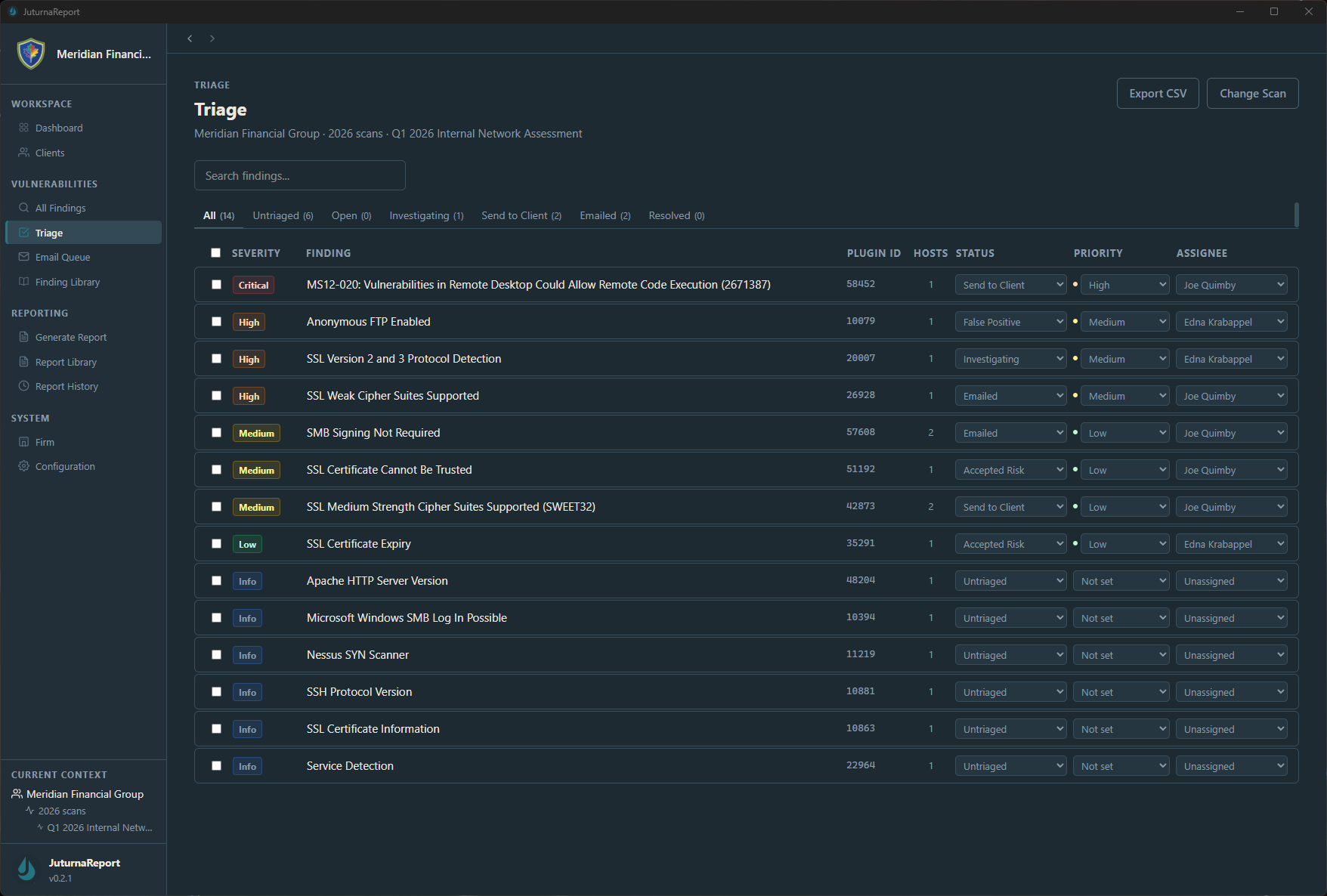
The triage view is where you’ll spend most of your time. Each finding shows up with its severity, plugin ID, affected hosts, current status, priority, and assignee. You can filter the list by status to see what’s unfriaged, what’s been sent to a client, what’s been dismissed, and what still needs investigation. The keyboard shortcuts let you move through findings quickly once you get the rhythm down, which was a deliberate design choice because I’ve reviewed enough scan results to know that speed matters when you’re looking at hundreds of items.
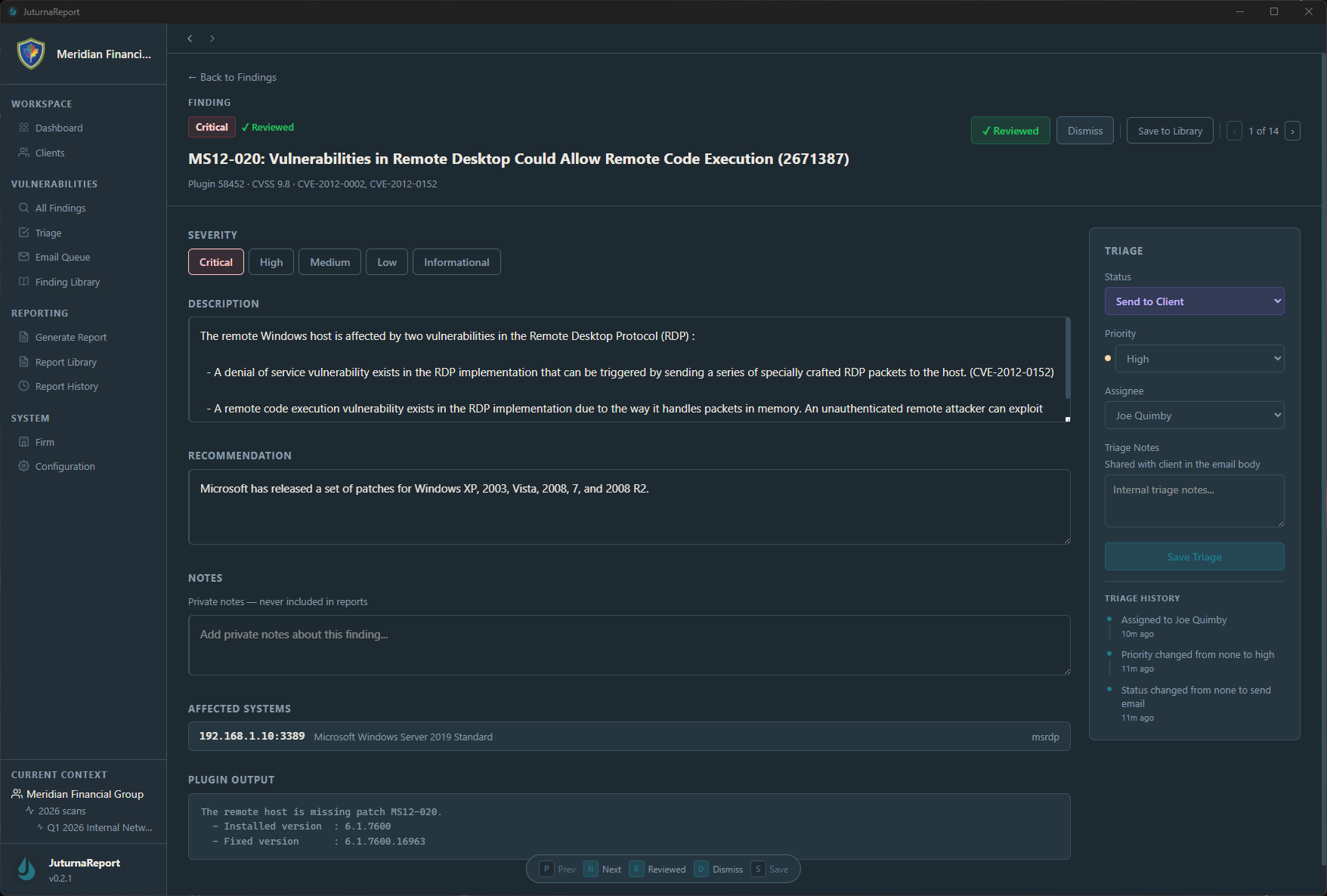
Once you open an individual finding, you get the full detail view with the vulnerability description, the recommendation, affected systems, plugin output, and a triage panel on the right side where you set the status, priority, and assignee. There’s also a notes field that stays private and never appears in reports, which is useful for documenting your reasoning on findings that might seem unusual or that you want to revisit later. The triage history tracks every change, so if someone asks why a particular finding was dismissed or escalated three weeks ago, the answer is recorded.
Reporting Without the Pain
The second major piece is report generation. Once your findings are triaged, JuturnaReport can produce a structured PDF vulnerability assessment report with customizable templates. You choose which sections to include, how findings are grouped and sorted, and what level of detail appears. The goal is to go from completed triage to a professional report in minutes rather than the hours it typically takes to build one manually in Word or Google Docs.
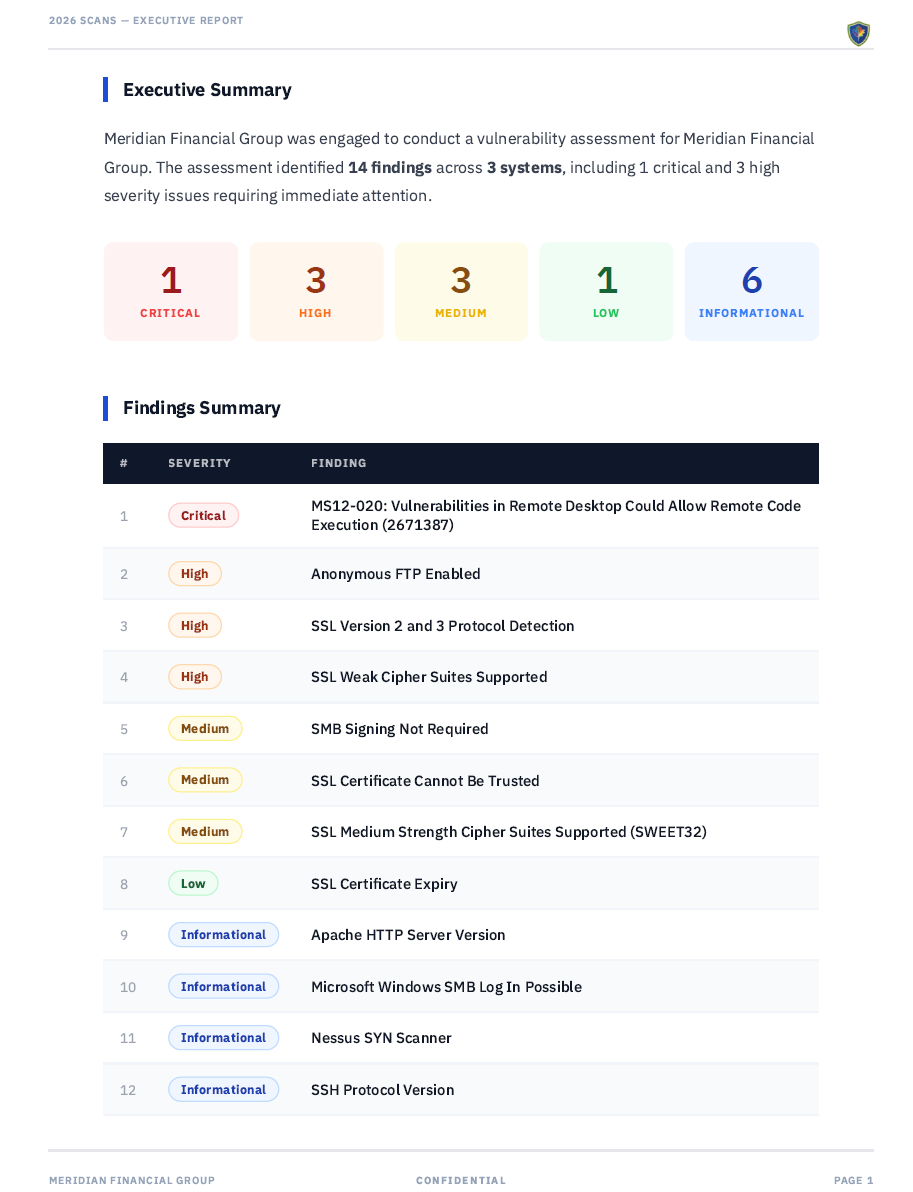
There’s also a finding library, which is something I wish I’d had years ago. You build a reusable collection of vulnerability descriptions, remediation guidance, and severity ratings that persist across engagements. When you encounter the same SSL configuration issue or the same missing patch category for the third time in a month, you pull it from your library instead of rewriting the description from scratch. Over time, your library becomes a living knowledge base that captures how your team describes and remediates the most common findings, which makes your reports more consistent and your triage faster with every engagement. It sounds like a small thing the first time you use it, but when you’re producing reports regularly, the time savings compounds quickly and the quality improvement is noticeable.
Why It’s a Desktop App
One of the first questions people ask is why JuturnaReport is a desktop application rather than a cloud service, and the answer comes directly from the nature of the data it handles. Vulnerability scan results contain IP addresses, hostnames, software versions, configuration details, and sometimes credentials or other sensitive information about your environment or your client’s environment. I didn’t want that data leaving anyone’s machine, and I didn’t want to build a product that required users to trust a third party with their most sensitive security findings.
JuturnaReport stores everything in a locally encrypted SQLite database using AES-256 encryption via SQLCipher. The application runs entirely on your workstation. It supports full offline and air-gapped operation with a thirty-day license revalidation window, which matters for people working in classified environments, on isolated networks, or in organizations with strict data residency requirements. Nothing gets transmitted externally, and there’s no telemetry phoning home. The data stays where it belongs.
Who This Is For
I built JuturnaReport for the kind of teams I’ve worked on and managed throughout my career: small to mid-sized security and IT teams, consultants running vulnerability assessments for multiple clients, internal analysts producing regular scan reports for their organization, and managed service providers handling security work for several customers simultaneously. It’s not trying to be an enterprise vulnerability management platform that competes with Tenable.sc or Qualys VMDR. Those tools serve a different market at a different price point with a different set of requirements. JuturnaReport fills the gap between raw scanner output and the kind of structured, professional reporting that clients and stakeholders expect, without the cost, complexity, or infrastructure demands of enterprise platforms.
The pricing reflects that positioning. Early access is either forty-nine dollars per year or a one-time payment of one hundred forty-nine dollars for a lifetime license, and one license covers up to three machines with no per-user fees. It runs on Windows 10 version 1803 or later, needs 4 GB of RAM and about 200 MB of disk space, and installs in a few minutes. There’s no Docker deployment, no database server to maintain, and no web infrastructure to keep running.
Ticket Integration Via Email
One feature worth calling out specifically is the ticket system integration. JuturnaReport can send triaged findings directly to your ticket system via SMTP email. If your organization uses Jira, ServiceNow, Zendesk, or any platform that can create tickets from inbound email, you can route findings from JuturnaReport into your remediation workflow with minimal configuration. This bridges the gap between the security team triaging vulnerabilities and the operations team actually fixing them, which in my experience is where a lot of vulnerability management programs lose momentum. The findings get triaged, a report gets produced, and then the actual remediation work stalls because nobody created the tickets. Automating that handoff removes one of the most common friction points in the process.
Why I’m Sharing This
I started building JuturnaReport because I was tired of the workflow I was stuck in, and because every tool that existed either cost more than my team’s budget could justify or required infrastructure I didn’t want to maintain. There are open-source options that are capable but demand significant setup and ongoing maintenance. There are enterprise platforms that do everything but start at price points that make no sense for a five-person team. The middle ground, a tool that’s affordable, runs locally, doesn’t require a DevOps effort to deploy, and does the specific job of triaging scan results and generating reports, didn’t really exist in a form that I found satisfactory. So I built it.
JuturnaReport is fully functional today and in active development toward version 1.0. If you work with Nessus scan data and you’ve been doing your triage in spreadsheets, I’d encourage you to take a look. I’m not going to pretend it solves every problem in vulnerability management, because it doesn’t try to. What it does is take the specific, repetitive, time-consuming work of reviewing scan results, making triage decisions, and producing reports, and it makes that work significantly faster and more organized than doing it manually. For me, that was enough to justify building it, and based on the conversations I’ve had with other practitioners, I think it’ll be enough to justify using it.
The product page at juturnalab.com has a complete walkthrough of every feature, and the support page has documentation covering installation, your first engagement, report generation, and SMTP configuration. Early access pricing is available now, and every purchase directly funds continued development.